How to find your radio serial number
Your code is tied to the radio's serial. Here is where to look, brand by brand, and how to read it without mistakes.
Your radio code is tied to the serial number of the radio itself. Find that and you are most of the way there. Here are the usual places to look, starting with the easiest.
Check your paperwork first
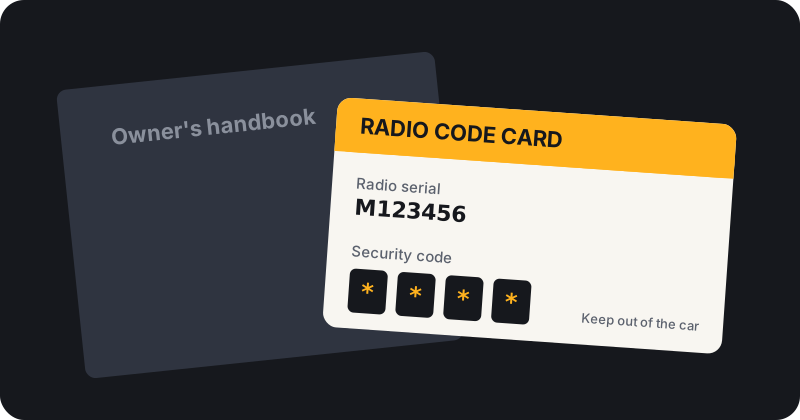
Some code cards and service books show the radio serial next to the code. Worth a look before you start removing trim. Look in the owner's manual wallet, the service book, the glovebox and any pocket in the boot floor kit. Vauxhall owners should also look for the Car Pass, a credit card sized document supplied with many cars.
Display the serial on screen
Many radios can show their serial, or a short precode, without being removed. The radio usually needs to be switched on, sometimes with the ignition on, and you hold a pair of preset buttons for a few seconds.
Ford
Some older Ford units show the serial when you hold preset buttons 1 and 6 while switching on. Ford serials often begin with M or V. See our Ford radio code guide.
Renault
Many Renault radios show a four character precode when you hold buttons 1 and 6. That precode is what you need. See the Renault radio code guide.
Vauxhall
On many CD30 and similar units the serial is not shown on screen, so you will need the Car Pass or the label. See the Vauxhall radio code guide.
Volkswagen, Audi, Skoda and Seat
Many VW group serials start with VWZ, AUZ, SKZ or SEZ and are printed on the label. Some units can show it on screen. See the Volkswagen radio code guide.
Honda and Toyota
Some Honda units show the serial with a preset button combination. Toyota ERC units can show an ERC code on screen. See the Honda and Toyota pages.
Read the label on the radio
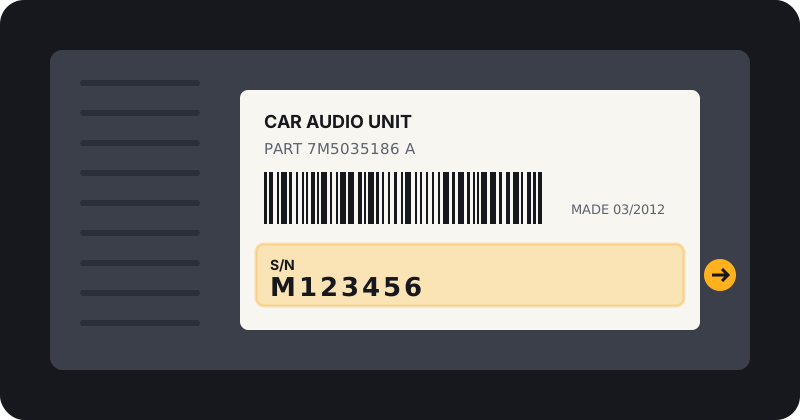
If the screen route does not work, the serial is printed on a label on the top or side of the radio casing. Getting to it usually means sliding the unit out with removal keys. If you are not confident, ask a garage or car audio fitter. Disconnecting the radio does not change its code, so there is no harm in removing it carefully.
On the label you will often see several numbers. Look for one marked S/N, Serial or SN. It is usually close to a barcode, and on many units it begins with letters that identify the maker.
Read it correctly
- O and 0 are easy to confuse. So are B and 8, I and 1, S and 5.
- Ford serials often start with M or V. Copy every character.
- Ignore barcodes, part numbers and dates. Send only the serial.
- If unsure, take a clear photo and email it to support@radiocodefast.com.
Serial, part number or precode?
| What you see | What it is | Send it? |
|---|---|---|
| S/N or Serial | Unique to your radio | Yes |
| Precode on screen (Renault style) | Short code shown by the radio itself | Yes, in the serial box |
| ERC code (Toyota style) | Code shown on screen when locked | Yes, in the serial box |
| Part number or model number | Identifies the type of radio | Optional, in the model box |
| Barcode or date stamp | Production data | No |
Frequently asked questions
Can I find my radio serial without removing the radio?
Often yes, using a button combination or your paperwork. It depends on the brand and model.
Is the serial number the same as the part number?
No. The part number identifies the model of radio. The serial is unique to your unit.
Can I use my VIN instead?
For some brands a dealer can use the VIN. Our form needs the radio serial.
What if the label is worn or missing?
Try the on screen method for your brand first. If that does not work, email a clear photo of whatever is left of the label to support@radiocodefast.com and we will tell you if it is readable.
Got your serial number?
Send a free request. Our team retrieves your code and emails it to you.
Still stuck? Read the radio code FAQ or see how to enter your code once it arrives.