Toyota radio code and ERC code
Many Toyota and Lexus radios lock after a battery change and show an ERC code, or ask for a code. Here is how to find what we need.
- Free request
- Processed by our team
- Owners only
Request your free radio code
Free for owners. A person on our team handles every request.
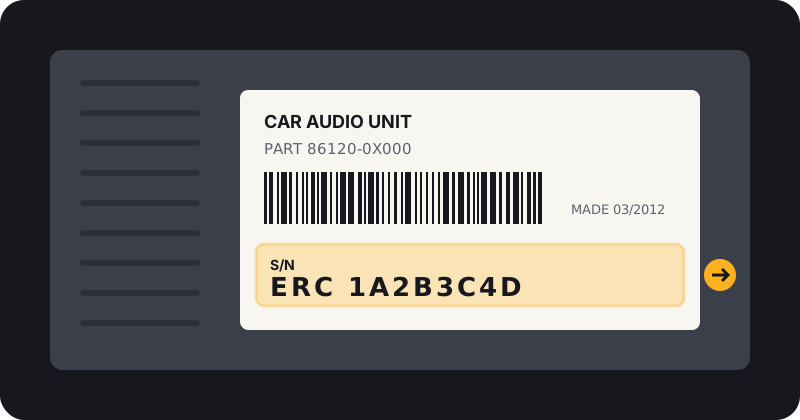
Where to find your Toyota radio serial
On many Toyota units, press and hold the power or info button, then follow the on screen steps to show the ERC code. Otherwise the serial is on the label on the radio.
More help: how to find your radio serial number.
How we handle Toyota requests
Toyota requests are processed by our team and emailed to you. Timing may vary.
Every request needs your email, accepted terms and an owner statement. This service is for owners restoring their own radio only.
Official Toyota options
A Toyota or Lexus dealer can help with proof of ownership. Some radios were set up with a personal code by the first owner, so check your paperwork.
Lexus
Some Lexus models use the same ERC system. Choose Lexus on the form.
ERC or serial: which to send
If your screen shows an ERC code, send that in the serial box. If it does not, send the serial from the label. Add the model or radio type if you know it.
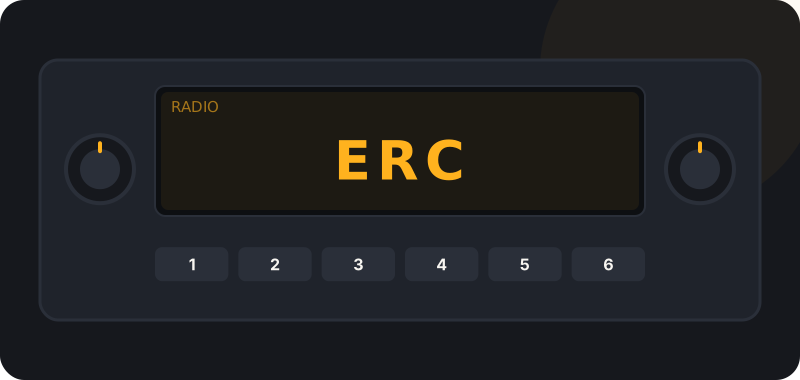
Entering your Toyota code
Use the preset buttons to set each digit and confirm. Too many wrong tries will lock the radio for a while. Full steps: how to enter your radio code.
Frequently asked questions
What is a Toyota ERC code?
A code the radio shows on screen that is used to get the unlock code.
Can I send the ERC instead of the serial?
Yes, put the ERC code in the serial field.
My Toyota radio says ERROR. What now?
Wait with the radio on, then try again carefully.
Ready to request your Toyota code?
It is free. Our team processes every request and emails your code.
Other brands: radio codes by brand. General questions: FAQ.